
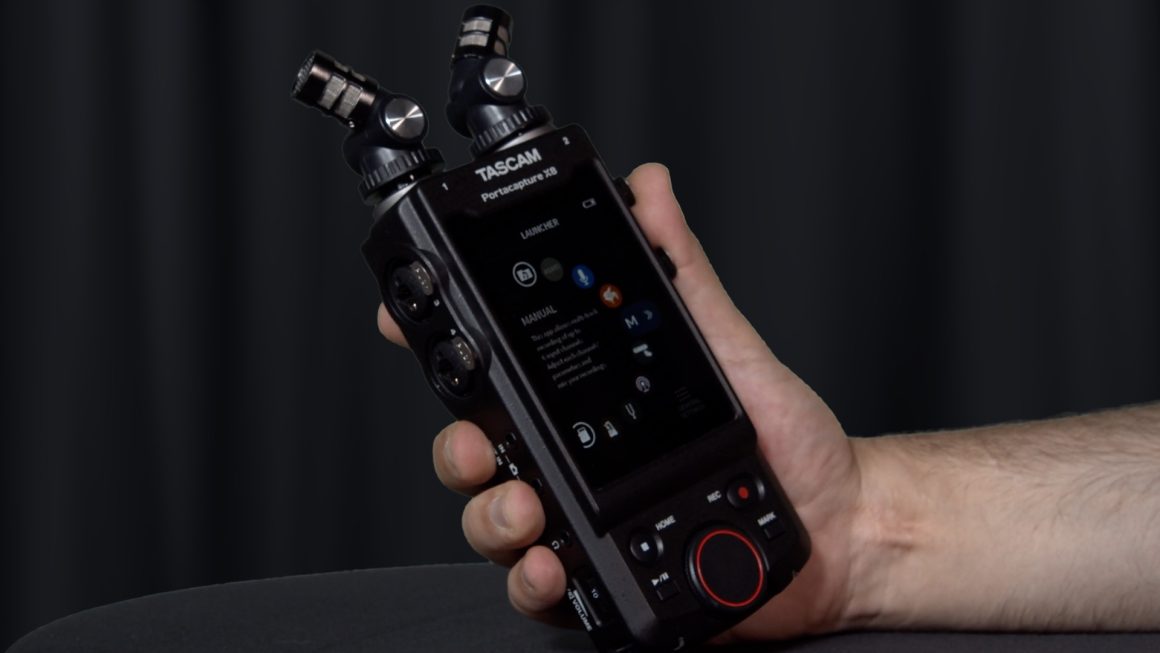
Good audio has a way of exposing weak plans faster than bad video ever will. That is why the Portacapture X8 recorder is getting fresh attention from U.S. creators who record interviews, nature beds, short films, local music sets, and podcast segments outside a treated room. The draw is not one shiny spec. It is the feeling that a small recorder can cover a lot of messy American workdays without punishing you for one missed gain move. For readers comparing audio buying guides before spending real money, this kind of buzz matters because it comes from friction: wind, traffic, loud voices, quiet birds, school gyms, wedding halls, and borrowed studio corners. TASCAM’s own official product page points to eight-track recording, 32-bit float capture, a color touchscreen, detachable mics, and USB audio interface use. The better question is not whether the recorder looks strong on paper. It is whether those details solve the problems field recordists face when the take cannot be repeated.
Why the Buzz Feels Earned, Not Random
A recorder can become popular for shallow reasons, but this one has a more practical story behind it. Many people who record sound in the field are not full-time sound mixers. They are video shooters, podcast hosts, birders, church media volunteers, students, indie documentarians, and musicians trying to catch a clean take without hauling a rack of gear. That mixed crowd explains why the conversation has spread across forums, video channels, and small creator circles. The tool is being judged less like a luxury toy and more like a problem solver.
Why a 32-bit float recorder changes casual outdoor work
The appeal of a 32-bit float recorder is easy to oversell, so it needs plain language. It does not make bad microphone placement sound rich. It does not remove wind rumble. It does not make a noisy street quiet. What it can do is give you more room when a sound jumps louder than expected.
That matters in the real places people record. A high school marching band in Ohio, a food truck interview in Los Angeles, or a thunderstorm ambience take in rural Georgia can move from soft to harsh in one breath. Older workflows ask you to ride levels with nervous hands. A 32-bit float recorder gives you a better chance to rescue a hot moment later, as long as the mic and input stage were not abused beyond reason.
The non-obvious part is this: less fear can make you record better. When you stop staring at meters every second, you listen to the scene. You notice the refrigerator hum behind the speaker. You hear the dog tags before the dog walks through the shot. The safety net helps most when it gets your attention off the screen.
What the field recording community sees in the design
The field recording community tends to be hard on gear, and that is healthy. People who record outside care about small choices: battery life, button layout, cold fingers, file naming, tripod threads, handling noise, card habits, and whether a screen can be read when sunlight is bouncing off a sidewalk.
This recorder sits in an odd but useful middle lane. It is not a tiny pocket memo device, and it is not a full sound bag setup. It gives you built-in microphones for fast capture, four combo inputs for external mics or line feeds, and a touchscreen system that feels closer to a phone than a menu tree from a decade ago.
That middle lane explains much of the conversation around it. A wildlife hobbyist in Colorado may want to catch creek ambience at dawn. A wedding filmmaker in Florida may need backup audio from the DJ board and a pair of room mics. Those jobs look different, but both reward a recorder that can change roles without making the operator feel trapped.
There is another reason the field recording gear crowd pays attention to this kind of design. The best recorder is often the one you bring without arguing with yourself. If a device feels too precious, too slow, or too specialized, it stays in a case. A field tool needs enough power to matter and enough ease to leave the house.
How Portacapture X8 Recorder Fits U.S. Creator Workflows
The rise of this model makes sense because the line between creator, sound person, and editor keeps blurring. A person filming a city council clip may also be cutting reels that night. A musician may be tracking rehearsal, making social videos, and saving ideas for a later mix. One box that records and connects to a computer has more value now than it did a few years ago. That does not make it the right tool for every room, but it does make the pitch feel current.
When a portable audio recorder fits real U.S. jobs
A portable audio recorder earns its keep when it is close enough to use before the moment disappears. That sounds simple, but it is where many setups fail. A recorder that stays in a closet because it needs too much prep is not part of your workflow. It is a receipt with knobs.
Think of a local journalist covering a county fair in Iowa. The day may include a sit-down interview, a tractor pull, PA announcements, crowd noise, and a quick voiceover recorded in a parked car. In that mix, a portable audio recorder must change from handheld capture to mic input duty without turning the day into a tech rehearsal.
This is where TASCAM’s app-style approach has a point. Presets can annoy experts who want every setting in view, yet they help newer users get moving. The counterintuitive insight is that simple screens can support serious work when they reduce setup mistakes. Speed is not the enemy of craft when the sound source is about to walk away.
The same logic applies to small teams. A two-person video crew in Phoenix may need one person to frame the shot while the other watches audio. If the recorder can get armed fast, label a scene, and show the problem before the interview starts, it has already earned trust. Good workflow is not glamorous. It is fewer apologies in the edit.
Why touchscreen control divides experienced users
Touchscreens split opinion because field recording gear lives in dirty, cold, bright, awkward places. A glass panel can feel risky when you are wearing gloves beside a creek or working a crowded press line. Some recordists want hard buttons because muscle memory keeps them calm.
Yet the touchscreen also solves a real problem. Many handheld recorders hide settings in nested menus that feel like a tax on every session. When you need to arm tracks, set recording format, check phantom power, name a file, or switch modes, a clear screen can save a take.
The smart view is not that touchscreens are better. It is that they shift the risk. You trade some blind control for faster visual setup. For a studio-trained engineer, that may feel like a loss. For a solo creator juggling camera, notes, and talent release forms, it can feel like oxygen.
There is a training benefit too. A screen that shows signal flow can teach newer users what is happening inside the recorder. They begin to see tracks, sources, and mixes as separate things. That lesson carries over later when they open editing software and stop treating audio as one flat lump.
Sound Quality, Inputs, and the Small Choices That Matter
Specs draw attention first, but sound work is built from small choices. The recorder is only one piece. Mic choice, mic distance, wind protection, gain habits, room tone, headphone checks, and file backup still decide whether a project feels polished. Gear cannot replace judgment. A common mistake is treating the recorder as the hero of the chain. It is not. It is the witness. The microphone hears, the placement shapes, and the room decides how much trouble you bring home. The recorder’s job is to preserve the choices you made, not bless them after the fact. That is why the smartest buyers look past the headline and ask how each feature changes the choices they make under pressure.
What buyers miss when comparing field recording gear
People often compare field recording gear by counting inputs and reading bit depth. Those numbers matter, but they do not tell the whole story. A recorder with four XLR combo inputs can be overkill for a nature walk and perfect for a panel talk. A built-in mic pair can be handy for fast stereo capture and still be the wrong choice for a windy street interview.
A better question is, “What kind of mistakes do I make most?” If you often miss loud peaks, 32-bit float helps. If you often place mics too far from people, no recorder will save the take. If you work alone, fast menus and clear meters may matter more than an extra feature you touch twice a year.
That is the hidden buying lesson. The right recorder is not the one with the longest spec sheet. It is the one that fits your weak spots. For some users, that means buying better wind protection before buying another capsule. For others, it means moving up from a phone rig to a recorder with cleaner input options and safer files.
One overlooked issue is headphone discipline. Many buyers obsess over sample rates, then record a whole interview without monitoring. A recorder with strong options will still capture chair squeaks, necklace taps, and air vents if nobody listens. The boring habit beats the fancy feature.
How the input layout supports layered recordings
The X8’s appeal grows when you think in layers. You can record a stereo ambience bed with the detachable microphones, feed a lav or shotgun into an external input, and keep a stereo mix for quick review. That kind of setup is useful for small documentary teams, church event crews, and musicians recording live rooms without a laptop nearby.
Picture a bluegrass trio playing in a Nashville living room. The built-in mics can catch the room picture, while external microphones focus on vocal and instrument detail. No, this will not replace a full studio session. It can still capture a strong rehearsal demo that has space, timing, and feel.
The non-obvious benefit is not raw track count. It is decision freedom after the take. When you have separate tracks, you can lower the loud room mic, repair a short overload, or build a cleaner mix for a short video. That saves more projects than people admit.
There is also a backup mindset here. A creator recording a nonprofit fundraiser in Atlanta might take a board feed, capture the room, and record a nearby speaker mic. If one source is thin or harsh, the others give the edit room to breathe. Redundancy sounds like a technical concern until it saves a once-only speech.
Buying Advice Before You Follow the Viral Push
A product can be worth the attention and still be wrong for some buyers. That is where the online buzz needs a brake pedal. The recorder looks tempting because it covers many jobs, but smart buying starts with the work you do each week, not the work you hope to do someday. The most expensive mistake is not buying a bad recorder. It is buying a good one for the wrong habits.
Who should buy it, and who should pause
This recorder makes the most sense for creators who record in changing locations and need more than a phone, a small USB mic, or a two-input device. It suits indie video teams, podcasters who travel, sound students, live music hobbyists, and field recordists who want built-in mics plus external inputs in one unit.
It may be too much for someone who records only desk voiceovers. It may be too little for a production sound mixer who needs a full bag, timecode-heavy routing, physical faders, and long days on set. A viral product is not a personality test. You do not need it because other people are excited.
One practical test helps: name your last five recording jobs. If at least three would have been easier with more tracks, safer headroom, or faster setup, the interest is grounded. If not, spend money on microphones, stands, headphones, acoustic treatment, or a course that makes your current kit sound better.
Budget should include the unglamorous items. A recorder purchase without headphones, storage, power, cables, and wind protection is only half a kit. Many U.S. buyers learn this after the first outdoor session, when a cheap cable crackles or a breeze ruins the best line of the day.
Setup habits that make the recorder worth owning
A strong recorder still needs boring habits. Use headphones before every take. Format cards in the device. Label files before the day gets chaotic. Carry fresh AA batteries or a USB power plan. Pack real wind protection, not the thin foam that comes in many boxes.
Build one or two repeatable setups. For example, save a fast interview setup with one shotgun and one safety track, then a separate ambience setup with the stereo mics. Pair that with a simple file routine from creator gear setup checklist and a second guide like beginner podcast recording workflow once those pages exist on your site.
The counterintuitive truth is that a flexible recorder gets better when you use it in fewer ways at first. Learn two setups deeply. Then add the odd cases. People blame gear when they are actually fighting their own lack of routine.
Do a five-minute home drill before any paid or one-time event. Record your voice from three distances, clap once, walk around the room, then listen back on headphones. That tiny habit teaches more than a spec sheet because it shows how distance, reflections, and handling noise behave in your own hands.
Conclusion
The excitement around this recorder makes sense because it speaks to a real shift in how people capture sound. More U.S. creators are working in mixed spaces, from parks and school gyms to client offices and spare bedrooms. They need gear that forgives sudden volume changes, handles several sources, and moves from field work to computer use without turning the whole session into a puzzle.
That does not mean the Portacapture X8 recorder is magic. The best results still come from close mic placement, smart wind control, clean file habits, and ears that catch problems before the red light starts. Yet the appeal is honest. It gives solo creators and small teams more breathing room at the exact moment when audio mistakes cost trust.
The better move is not to buy because the community is talking. Buy because your work has outgrown the tool in your hand, and this one solves the problems you keep meeting in real rooms, real streets, and real weather.
Frequently Asked Questions
Is the TASCAM X8 good for beginner field recording?
Yes, it can work well for beginners who want room to grow. The touchscreen presets help reduce setup stress, while the extra inputs leave space for better microphones later. New users still need headphones, wind protection, and practice with mic placement.
Does 32-bit float mean I never need to set levels?
No. It gives more recovery room when sounds jump in volume, but it does not fix bad mic placement, wind blasts, clipped microphones, or noise from a poor location. Treat it as a safety net, not a reason to stop listening.
What is the best use for the built-in microphones?
They are best for quick stereo ambience, room tone, rehearsals, sound effects, and fast idea capture. For interviews, a closer external microphone often sounds cleaner because distance matters more than the recorder’s built-in mic design.
Can this recorder replace a podcast audio interface?
For many small podcast setups, yes. It can connect to a computer as a USB audio interface, which helps when recording into software. A fixed studio may still prefer a desktop interface with large controls and permanent cabling.
Is it worth buying for YouTube video work?
It is worth considering if you film interviews, travel pieces, music sessions, or outdoor scenes where camera audio falls short. The main value is flexible capture. For sit-down videos only, a simpler two-input setup may be enough.
What accessories should I buy first?
Start with closed-back headphones, spare memory cards, wind protection, and a steady mount or small tripod. After that, add an external shotgun, lavalier, or stereo pair based on the kind of sound you record most often.
How does it compare with smaller handheld recorders?
Smaller recorders win on pocket size and low-friction carry. This one offers more tracks, more input options, and stronger growth potential. The better choice depends on whether you need quick capture only or a wider recording setup.
Who should skip this recorder?
Skip it if you only record desk narration, phone notes, or simple one-person podcasts. Also pause if you need a full professional sound bag with timecode-centered routing and physical faders. The best purchase matches the work you do now.